Difference between a Site Page and an Application Page Here we will check what is the difference between a site page and an application page in Sharepoint. There are two types of pages in SharePoint. 1. Site Pages 2. Application Pages Common on them: They both inherit their layout from the same master page. 1. Site Pages: A site page contains text, images, web parts etc and Site pages are stored in the file system. But a end user can create, edit or customized a site page using sharepoint designer or browser. But once an end user modified the site page using SharePoint designer, the template for this page is stored in the content database rather in file system. So every time a user requested the page, the page is retrieved from the content database. At the same time you can also reset to the original template using designer. A site page can contain inline server code, but once it becomes customized it can not contain. A site page can also host features such as dynamic Web ...
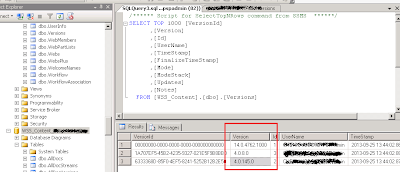
Today i have faced one issue while mount content database to server. the issue is " This content database has a schema version which is not supported in this farm." I was getting this error when i ran Mount-SPContentDatabase using powershell. I tried checking SP versions and other things finally got solution in below way Reason: Once you have taken the backup from SharePoint 2013 content database, usually you will restore the database in the target SQL server. After restoring the database, you will try to restore content database in any one of Webapplication most probably new one. In this stage, you will get the above error message. Solution: Your source SQL server schema and the destination SQL server schema might not be matched. So you need to update the "Versions" table values in the "Restored Database". 1. Open " Versions " table from any of the existing "Content database" from the Target SQL Server machine in ...
OK, How to solve this error? Login to the site collection with either site collection administrator or Farm Admin (granted with "Full control" Web Application user policy!), grant appropriate access to the user in question by going to Site Settings >> People and Groups. Once you do this, users prompted for credentials instead of the Sorry, this site hasn't been shared with you error. Still getting same "Sorry, this site hasn't been shared with you."? Might be because of cached credentials from a prior browser session. Try clearing IE cache: Open a new browser window >> Go to Internet options >> In the general tab, click the Delete button >> Make sure that passwords and temporary Internet files are selected. Try different browser such as Firefox! If you didn't run product and configuration wizard after installation/patch, you may get this error even if you are a site collection administrator. Run it once and get rid of this is...
Comments
Post a Comment